TOOLBOX / TUTORIAL
Using HexCore: A Coordinate Utility System for Hex Grids in Unity
Effortlessly convert world positions, hex coordinates, and chunks with precision.
📜 Get the Script: HexCore on GitHub
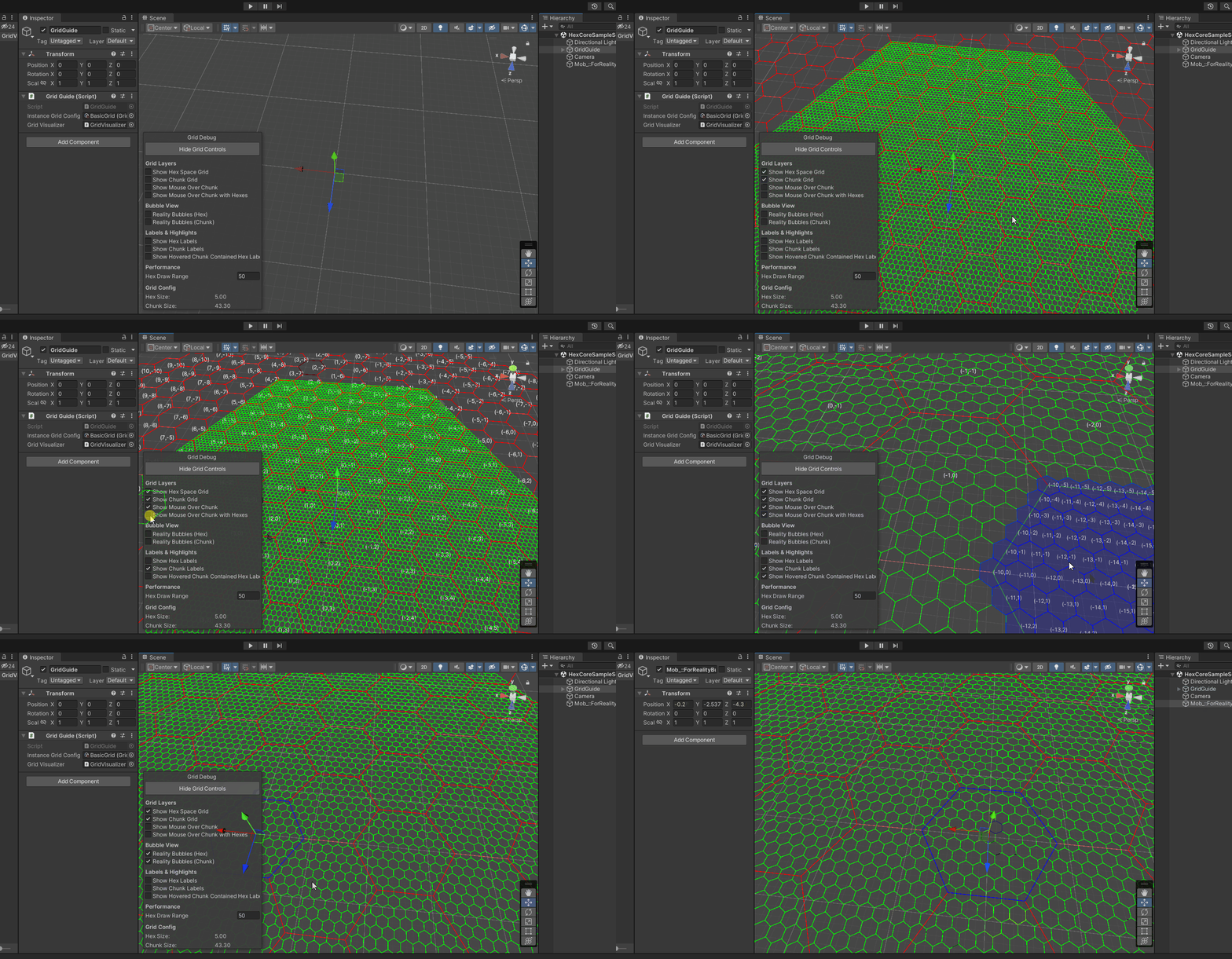
Overview
HexCore is a C# system designed to handle hex coordinate conversions in Unity. It provides functions to accurately place, reference, and manage hex positions, making it perfect for procedural terrain, navigation, and debugging.
- 📍 Convert world positions to hex coordinates and vice versa.
- 📦 Chunk-based organization for efficient grid management.
- 🛠️ SceneView debugging tools to visualize hex placement.
- 🔄 Supports flat-top & pointy-top hex orientations.
💡 How It Works
HexCore allows you to easily place, reference, and retrieve hex positions in Unity using different coordinate systems.
1️⃣ Convert World Position → Hex Coordinates
Use WorldToAxial() to find out which hex a world-space position belongs to.
Vector3 worldPos = new Vector3(10f, 0f, 10f);
Vector2Int hexCoords = HexUtilities.WorldToAxial(worldPos, HexOrientation.FlatTop, hexSize);
Debug.Log($"World Position {worldPos} → Hex Coords {hexCoords}");
2️⃣ Convert Hex Coordinates → World Position
Use AxialToWorld() to convert axial coordinates back to world-space.
Vector2Int hexCoords = new Vector2Int(3, -2);
Vector3 worldPos = HexUtilities.AxialToWorld(hexCoords.x, hexCoords.y, HexOrientation.FlatTop, hexSize);
Debug.Log($"Hex {hexCoords} → World Position {worldPos}");
3️⃣ Get the Chunk a Hex Belongs To
HexCore organizes hexes into chunks for efficient rendering and logic grouping.
Vector2Int chunkCoords = HexUtilities.AxialToChunk(hexCoords, chunkSize);
Debug.Log($"Hex {hexCoords} is in Chunk {chunkCoords}");
4️⃣ Find Neighboring Hexes
Retrieve adjacent hexes using cube coordinates.
Vector3Int hexCube = HexUtilities.AxialToCube(hexCoords);
Vector3Int neighbor = HexUtilities.CubeNeighbor(hexCube, 0); // 0 = East
Vector2Int neighborAxial = HexUtilities.CubeToAxial(neighbor);
Debug.Log($"Neighboring Hex: {neighborAxial}");
🖼 Debugging & Visualization
If you have GridVisualizer enabled, you can visualize hex grids in Unity’s SceneView.
🔍 Enable Grid Display
Toggle visualization of the hex and chunk grids:
visualizer.showHexSpaceGrid = true;   // Show hex grid
visualizer.showChunkSpaceGrid = true; // Show chunk grid
🎨 Draw a Hex in SceneView
Use DrawHexagonHandles() to display hex outlines.
HexUtilities.DrawHexagonHandles(worldPos, hexSize, HexOrientation.FlatTop, Color.green);
🌎 Why Use HexCore?
- 📏 Precise Mapping: Ensure accurate hex placement across your world.
- 🔄 Simplified Conversions: Effortlessly switch between axial, world, and chunk coordinates.
- 📊 Built-in Debugging: Visualize hexes in SceneView for instant feedback.
🚀 Start Using HexCore
HexCore is free and open-source. Download it from GitHub and integrate it into your project today!
🔗 Get the Full Source Code: HexCore on GitHub